Setting Up
Before jumping into your first song, it’s worth spending a few minutes setting up your play area and checking a handful of basic settings.
A comfortable, well-configured setup can make a significant difference to your overall experience. It can improve consistency, reduce unnecessary distractions, and help ensure that any problems you encounter later are genuine calibration issues rather than something simple like an incorrect controller mapping or display setting.
This page covers the basics of preparing your setup before moving on to the more detailed calibration process.
If you don’t already own a drum controller, Taiko no Tatsujin can also be played using a keyboard or standard game controller. In fact, these control methods are often simpler to set up, as they typically require little or no additional configuration.
This section primarily assumes you’re using a drum controller, but most of the advice still applies regardless of your chosen control method. If you’re thinking about purchasing a drum, the Controllers section later in this guide compares the available options and explains what to look for.
Before continuing, make sure you have:
- A copy of Taiko no Tatsujin: Rhythm Festival installed.
- A working drum controller, keyboard, or standard game controller.
- A pair of bachi if you’re using a drum controller.
- A stable playing surface, such as a desk or drum stand.
- Your monitor and preferred audio device connected.
Need a pair of bachi for your drum controller? The Bachi section covers everything from choosing your first pair to understanding different materials, sizes, and weights.
On this page
Play Area
A comfortable play area makes it much easier to enjoy longer practice sessions and develop consistent technique. While there isn’t a single “correct” setup, spending a few minutes adjusting your environment before you start can make a noticeable difference.
Begin by placing your controller on a stable, flat surface that won’t slide or wobble while playing. Any movement can make your hits feel inconsistent and become increasingly frustrating as chart difficulty increases.
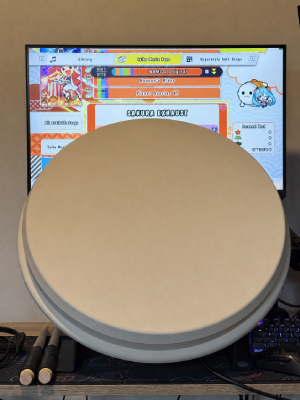
Think about your posture as well. Whether you prefer sitting or standing, try to position yourself so your shoulders remain relaxed and your arms can move freely without reaching too high or too low. Position your monitor at a comfortable viewing height where you can clearly see the judgement circle while keeping your neck in a natural, relaxed position. Small adjustments to your chair, desk, monitor, or controller position can make a noticeable difference to comfort over longer play sessions.
 |
|---|
| An example drum setup on desk with monitor behind. |
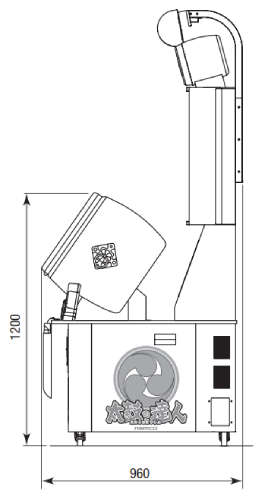
If you’re aiming for an arcade-like experience, position the playing surface of your drum so that the top of the drum sits approximately 1200 mm (120 cm) above the floor. This closely matches the height of a Taiko no Tatsujin arcade cabinet and helps recreate a similar playing posture and arm movement.
 |
|---|
| Official specs showing the 1200mm distance from the floor to top of the drum. |
Don’t worry about recreating the arcade perfectly. The goal is simply to create a setup that’s comfortable, consistent, and enjoyable to play on.
Controller Setup
Before starting the game, make sure your controller is connected correctly and all required inputs are recognised.
If you’re using an official HORI drum controller, setup is usually straightforward. The controller is recognised by the game without requiring additional software, allowing you to move straight on to calibration.
Many third-party drum controllers require a little more preparation. Depending on your controller, you may need to install configuration software, update firmware, or manually configure button mappings before the game recognises your inputs correctly. Some controllers also provide additional software for adjusting sensitivity or other advanced settings.
If you’re using a keyboard or standard game controller, it’s worth taking a moment to check the default controls. Many players prefer to customise the key or button layout to something that feels more comfortable before they begin playing.
Regardless of your chosen control method, it’s a good idea to confirm that every required input works correctly before continuing. It’s much easier to resolve any issues now than halfway through your first song.
Some third-party drum controllers require additional software before they can be used correctly. Always follow the setup instructions provided by the controller’s manufacturer or creator.
potential image: screenshot of RF control mapping screen, alongside an example of a third-party controller configuration software (maybe taikoller options or image of the e-box thing)
Display & Audio Settings
Before calibrating the game, it’s worth checking a few basic display and audio settings.
If your monitor supports higher refresh rates, ensure both your operating system and the game are configured to use your monitor’s maximum refresh rate. Although Taiko no Tatsujin doesn’t require a high refresh rate to be playable, smoother animation can improve visual clarity and make gameplay feel more responsive.
You should also check that the game is using your intended audio output device before beginning calibration. Different speakers, headphones, televisions, and audio devices all introduce different amounts of latency. If you change your audio device after calibrating, you’ll often need to calibrate again.
At this stage, there’s no need to adjust any timing offsets yet. The next guide explains how to measure and compensate for latency so that your hits line up accurately with the music.
potential image: Windows display settings showing refresh rate selection, or an in-game display settings screenshot, maybe nvidia control panel screenshot.
Reducing Noise
Drum controllers naturally produce a lot of noise. Each hit transfers impact through both the controller and the surface beneath it, with hard desks and tables often amplifying vibrations throughout the room.
Fortunately, there are several simple ways to reduce noise without permanently modifying your controller.
One of the most effective methods is placing the controller on a surface that absorbs vibration before it reaches your desk. Many players use a folded towel, thick foam mat, rubber mat, or even a firm cushion underneath their controller. These materials help dampen vibrations and can make a noticeable difference to the amount of noise transmitted through furniture.
Some players also place a thin cloth or towel over the drum surface itself to soften the impact sound. While this can make the controller quieter, it also changes the feel of the drum slightly, so it may not be suitable for everyone.
| Standard Setup | Towel Over Drum | Towel Under Drum |
|---|---|---|
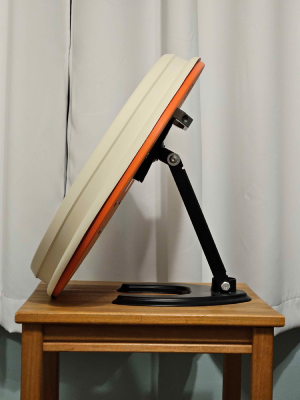 | 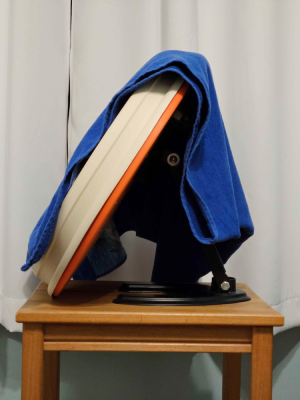 | 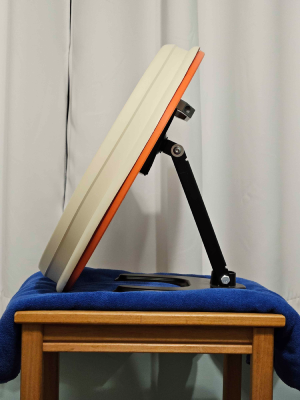 |
| No additional noise reduction. | Reduces the sound of the bachi striking the drum. | Reduces vibrations transferred into the desk or floor. |
Photos (above) courtesy of Kevin2o2.
If you live with family, housemates, or in an apartment or unit with shared walls, reducing vibration can make your setup much more considerate for those around you, particularly during early morning or late-night practice sessions. Even small changes to the surface beneath your controller can significantly reduce the amount of noise that travels through desks, floors, and walls.
Next Steps
At this point, your play area should be comfortable, your controller should be working correctly, and your display and audio settings should be ready for calibration.
Before calibrating, avoid changing your controller, monitor, or audio device unless necessary. Even small hardware changes can affect latency, meaning you’ll often need to recalibrate afterwards.
Calibration is one of the most important parts of setting up Taiko no Tatsujin at home. Every setup introduces some amount of latency, whether from your display, audio equipment, controller, or a combination of all three. Without calibration, even a perfectly functioning setup can feel inconsistent or cause accurate hits to register incorrectly.
The next guide explains what latency is, why it matters, and how to calibrate your setup so your inputs line up accurately with the music.
Read Next ➡️
🚧 taiko.guide is currently under active development.
Documentation is being added and expanded over time, so some sections may be incomplete or marked as work in progress.